Know what's behind
any URL.
Domain intelligence for developers and AI agents. One URL in, structured signals out. Your code decides what to do with them.
Intelligence, not opinions
Unphurl doesn't tell you a URL is safe or dangerous. It tells you the domain is 3 days old, impersonates paypal.com, has no MX record, and scores 80 out of 100 with your weights. You decide what that means.
A parked domain is a non-event for a security bot but a dealbreaker for a cold email campaign. The same signals, scored differently, serve both. That's why Unphurl returns structured data with transparent scoring, not binary verdicts.
Your threshold. Your use case. Your rules.
7 dimensions of analysis
Every unknown domain gets a full pipeline analysis. All checks run in parallel.
Redirect behaviour
Follows up to 10 hops. Detects shortener services, redirect loops, timeouts, and broken chains.
Brand impersonation
Levenshtein distance + homoglyph analysis against 150+ brands across 17 categories.
Domain intelligence
Age, registrar, expiration, status codes, and nameservers via RDAP.
SSL/TLS validity
Real TLS handshake from Cloudflare's edge. Checks certificate validity, not just presence.
Parked detection
4-layer detection: registrar placeholders, for-sale pages, empty content, parking services.
URL structure
Length, path depth, subdomain count, entropy, IP detection, encoded characters, TLD changes.
DNS enrichment
MX record existence. No MX on a business domain means it doesn't receive email.
Your rules, your scoring
Same signals. Different priorities. One URL, scored for your use case.
23 configurable weights. Up to 20 named profiles per account. Every use case page includes a suggested profile.
Two ways in
Same intelligence, same signals. Choose the door that fits your workflow. No dashboard. No login portal. Your terminal or your AI tool is the interface. That's by design.
API and CLI
REST API with bearer auth, batch processing for up to 500 URLs, 23 configurable scoring weights, custom profiles per use case. CLI for quick checks and scripting.
- – Batch endpoint with async job polling and webhooks
- – Named scoring profiles (cold-email, security-bot, seo-audit)
- – JSON responses, score breakdowns, full signal data
MCP Server
Install the MCP server in Claude Code, Cursor, or Windsurf. Build an Unphurl skill for OpenClaw. Your AI checks URLs as you work. Add the companion skill and it checks them proactively, without being asked.
- – 13 tools: check, batch, profiles, billing, history, stats, verification
- – Sign up, buy credits, manage everything from your AI tool
- – Companion skill for proactive URL safety checking
Dashboards? GUI? There's no need.
Your interface already exists. No login portal. No buttons to click.
If you write code, your terminal is the dashboard. Every command, every result, every stat is right where you work.
If you use Claude, ChatGPT, or OpenClaw, the chat window is the dashboard. Ask for your balance, check a URL, buy credits, create a profile. All in conversation.
We built Unphurl for the way developers and AI agents actually work, not the way enterprise software thinks they should.
Claude Cowork: See it in action
One connector. One sentence. Full intelligence. No code required.
Connect Unphurl to Claude Cowork and check URLs by talking to your AI. Create scoring profiles, run batch checks, buy credits. All in conversation.
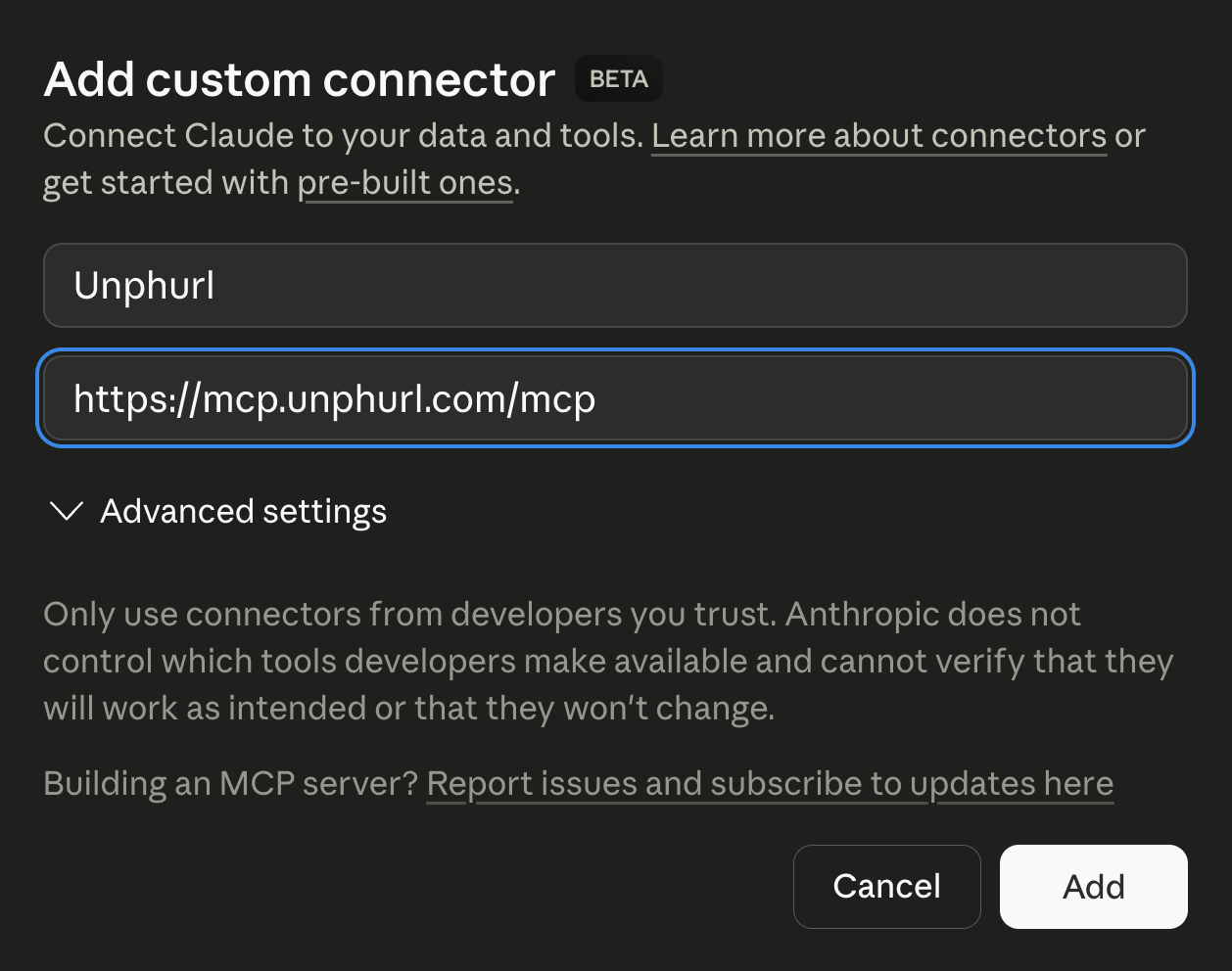
Add the connector
Paste one URL. Click Add. Done.
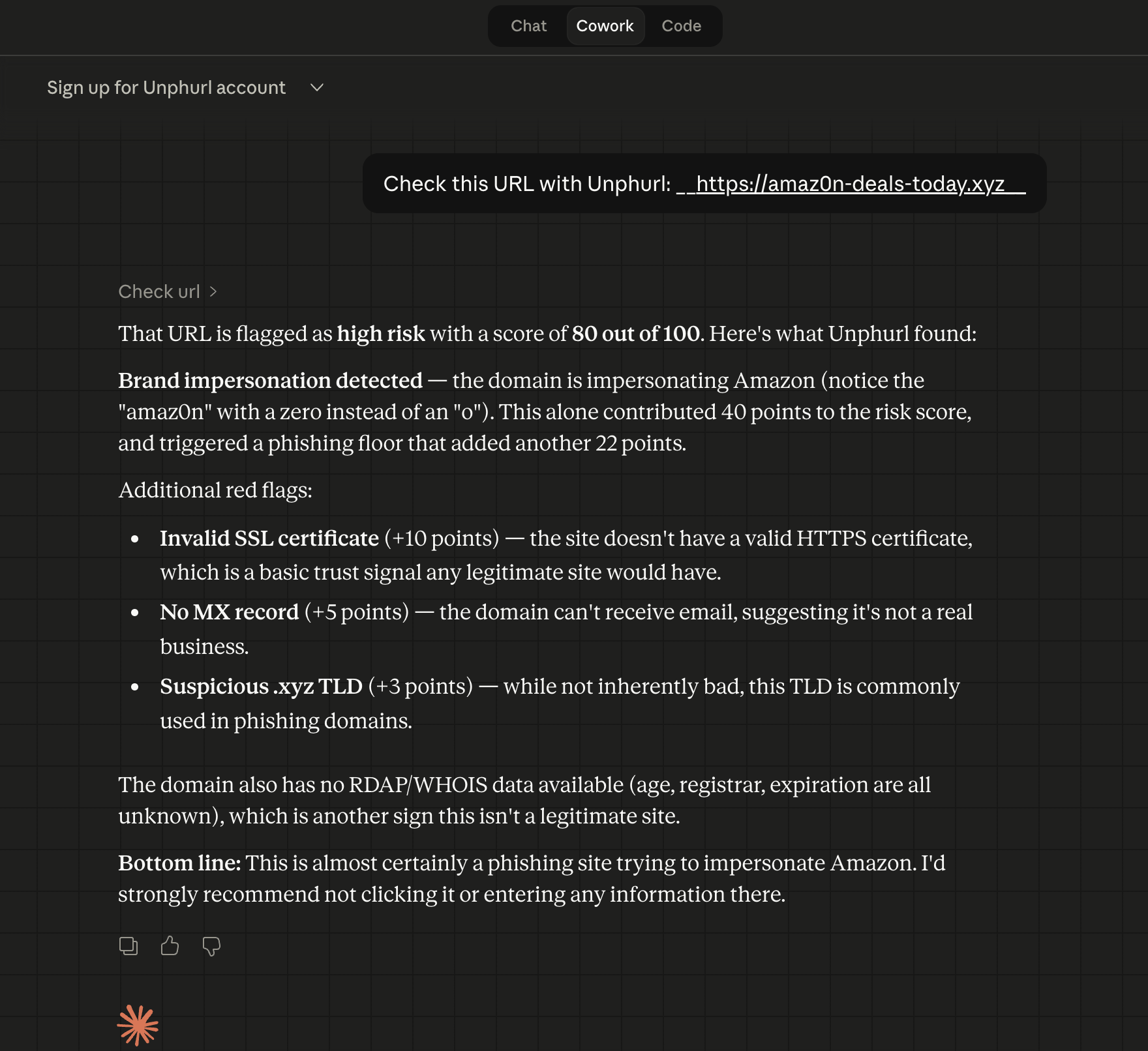
Check a URL
Score 80/100. Brand impersonation detected.
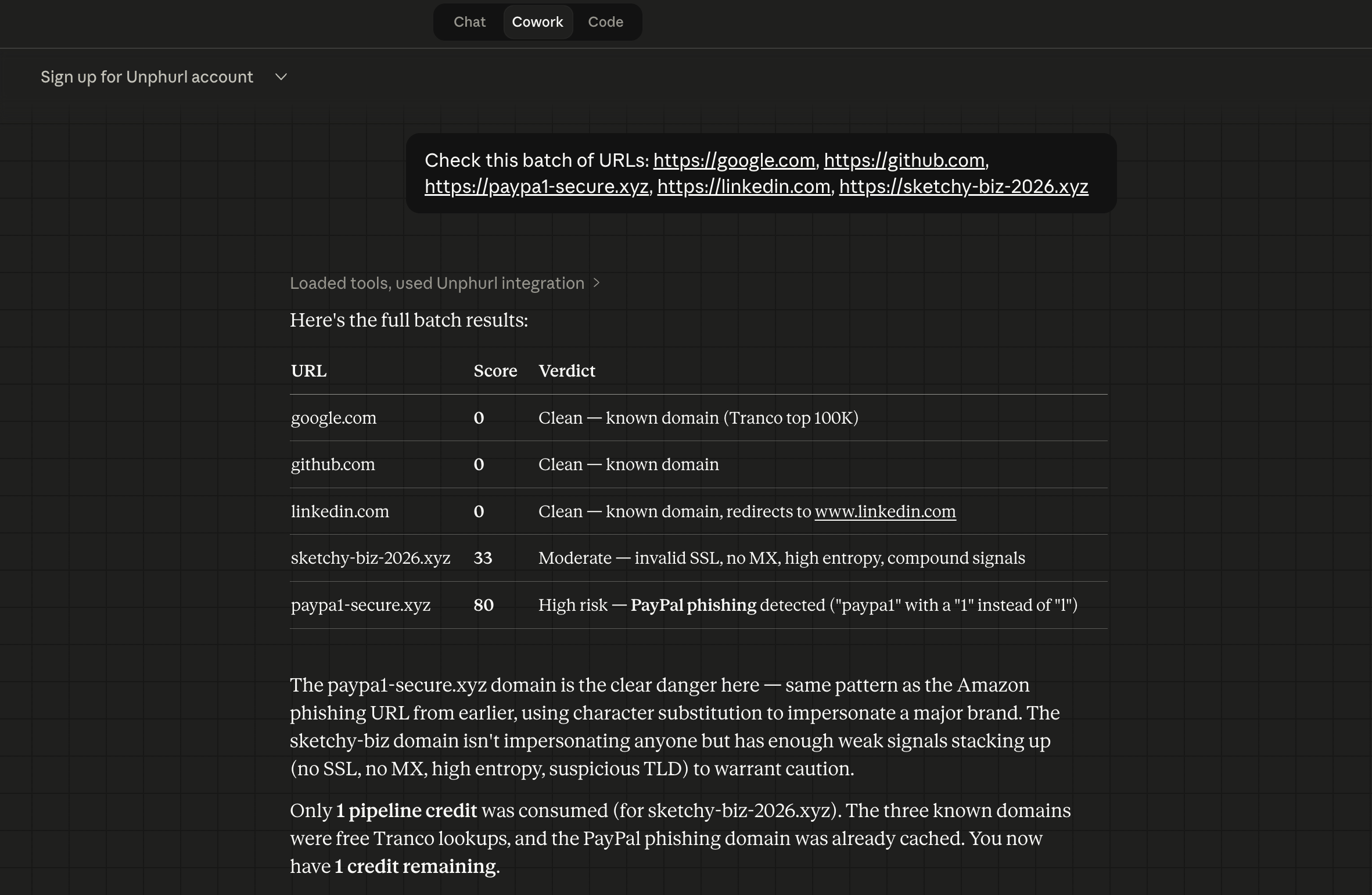
Batch check
5 URLs, results table, 1 credit used.
How Unphurl compares
Domain intelligence built for AI agents and automation, not enterprise sales cycles.
| Feature | Unphurl | Google Safe Browsing | VirusTotal | WhoisXML API | DomainTools | SecurityTrails |
|---|---|---|---|---|---|---|
| Structured signals (not verdicts) | ✓ | ✕ | ✕ | ⚠ | ✕ | ✕ |
| Configurable scoring (23 weights) | ✓ | ✕ | ✕ | ⚠ | ✕ | ✕ |
| Brand impersonation detection | ✓ | ✕ | ✕ | ✕ | ✕ | ✕ |
| Parked domain detection | ✓ | ✕ | ✕ | ⚠ | ✕ | ✕ |
| Data quality signals (MX, expiry) | ✓ | ✕ | ✕ | ✓ | ✓ | ✓ |
| Free lookups (known + cached) | ✓ | ✓ | ✓ | ⚠ | ✕ | ⚠ |
| Batch processing (up to 500 URLs) | ✓ | ✓ | ⚠ | ✓ | ✓ | ✓ |
| CLI tool | ✓ | ✕ | ✓ | ✕ | ✕ | ✕ |
| MCP server (AI-native) | ✓ | ✕ | ✕ | ✓ | ✕ | ✕ |
| No subscription required | ✓ | ✓ | ✕ | ✕ | ✕ | ✕ |
| Fair billing (refund on failure) | ✓ | N/A | ✕ | ✕ | ✕ | ✕ |
| Score breakdown transparency | ✓ | ✕ | ✕ | ⚠ | ✕ | ✕ |
| Usage analytics per account | ✓ | ✕ | ✕ | ✕ | ⚠ | ⚠ |
| Both security + data quality | ✓ | ✕ | ✕ | ⚠ | ⚠ | ⚠ |
| Entry price | $9 | Free | Free | Quote | $99/mo | $50/mo |
Built for real workflows
Same signals, different priorities. Scoring profiles let each use case define what matters.
OpenClaw agent safety
Check every URL before your autonomous agent follows it. Catch phishing and prompt injection attacks.
Cold email cleaning
Dead domains, parked sites, and missing MX records tank deliverability. Clean the list first.
Customer onboarding
Verify website URLs submitted during account signup. Catch parked domains and fake companies.
Crawler / content pipeline
Skip redirect traps, parked domains, and dead links. Save compute, keep your index clean.
Directory quality
Identify dead, parked, and abandoned business domains in your directory. Keep listings trustworthy.
Scheduled email checking
Claude scans your inbox on a schedule and alerts you to suspicious links. No code required.
Simple, transparent pricing
Most lookups are free. You only pay when Unphurl analyses a domain nobody has checked before. Credits never expire. No subscriptions.
Known domain?
Google, Amazon, GitHub, and 100,000 other known domains return instantly. Score 0. Free.
Previously analysed?
Cached signals from prior analyses. Scored fresh with your custom profile weights. The cache grows with every pipeline check across all customers.
Unknown domain
Full pipeline across 7 dimensions. One pipeline check consumed. Results cached for all future lookups by any customer.
Successful pipeline = credit charged. You got intelligence.
Failed pipeline = credit refunded. Automatically.
Batch deduplication: duplicates processed once, charged once.
Smart summaries when low on credits: know exactly what you need before buying.
Sign up and get 20 free pipeline checks. No credit card required.
$ unphurl signup --email you@example.com --name 'Your Name'See exactly where your credits go
Every account tracks usage across all three gates. Know your free rate, your pipeline spend, and which URLs got flagged.
Get started in 30 seconds
Check a URL
$ npx unphurl https://example.comCreate an account
$ unphurl signup --email you@example.com --name 'Your Name'MCP setup
Add to your .mcp.json in Claude Code, Cursor, or Windsurf:
{
  "mcpServers": {
    "unphurl": {
      "command": "npx",
      "args": ["-y", "@unphurl/mcp-server"],
      "env": {
        "UNPHURL_API_KEY": "uph_your_key_here"
      }
    }
  }
}